

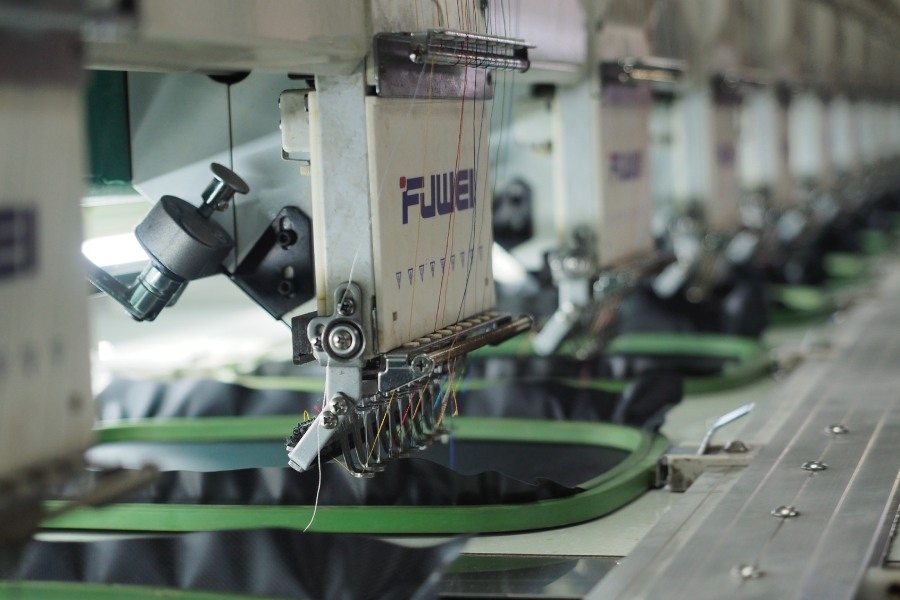
If you’ve ever looked at a crisp, cleanly stitched logo on a polo shirt or cap and wondered how it got there, the answer starts well before thread meets fabric. It starts with embroidery digitizing, the process of converting artwork into a stitch file that an embroidery machine can read and execute. Without digitizing, modern machine embroidery simply doesn’t happen.
At RiverCity Screenprinting & Embroidery in San Marcos, we digitize logos and designs for businesses across the Austin to San Antonio corridor every week. It’s one of those behind-the-scenes steps that most customers never think about, but it makes or breaks the quality of the finished product. Here’s how the whole embroidery digitizing process works, from artwork to stitched garment.
What Is Digitizing in Embroidery?
So what is digitizing embroidery, exactly? In simple terms, it’s the translation of a visual design (your logo, mascot, text, or graphic) into a set of machine instructions. Those instructions tell the embroidery machine where to place each stitch, what direction to sew, which thread colors to use, and how to move between sections of the design.
Think of it like this: your logo is a picture. The embroidery machine doesn’t understand pictures. It understands coordinates, stitch types, and sequences. A digitizer’s job is to bridge that gap, turning flat artwork into a working stitch file the machine can follow.
This process used to be called “embroidery punch” because early digitizers used paper tape with punched holes to store machine instructions. The technology has changed completely since then, but you’ll still hear old-timers use the term.
How Embroidery Digitizing Software Works
The entire embroidery digitizing process runs through specialized embroidery digitizing software. Programs like Wilcom, Pulse, Hatch, and Tajima DG/ML are industry standards, available for both PC and Mac. These applications give the digitizer full control over stitch placement, density, sequencing, and color assignments.
Here’s what happens inside the software, step by step.
Uploading and Preparing the Artwork
The digitizer starts by importing the design file into the software. This is usually a vector file (like .ai or .eps), though high-resolution raster images (.png, .jpg) can work too. The software displays the image as a reference layer, and the digitizer crops out unnecessary blank space around the design.
Clean, simple artwork digitizes best. Designs with tiny text, heavy gradients, or photographic detail often need to be simplified before they’ll stitch well. A good digitizer will flag these issues early.
Setting the Design Size
The dimensions get locked in at this stage. This matters more than most people realize. A logo that looks great at 4 inches wide might fall apart at 1.5 inches because there isn’t enough room for the stitch detail. Conversely, scaling a small design up without redigitizing can leave it looking sparse and loose.
The design size should match the exact dimensions it’ll appear on the finished product. A left-chest logo, a cap front, and a jacket back all require different sizing, and often different digitizing approaches for the same artwork.
Choosing Stitch Types
Not all stitches are created equal. The three main types used in machine embroidery are:
- Satin stitches: Parallel back-and-forth stitches that create a smooth, shiny finish. Great for text, borders, and narrow columns. Most lettering uses satin stitches because they produce clean, readable characters.
- Fill stitches (tatami): Rows of running stitches that cover larger areas. The pattern of these rows can be adjusted to create different textures. Fill stitches are the workhorse of embroidery, covering backgrounds, large shapes, and broad design elements.
- Running stitches: Single-line stitches used for outlines, fine details, and underlay. They don’t create much visual coverage on their own, but they’re essential for structure.
A skilled digitizer selects stitch types based on the design’s shapes and the visual effect needed. Mixing stitch types within a single design is standard practice and gives the finished piece depth and texture.
Programming Stitch Direction
Stitch direction controls how light reflects off the thread surface, which directly affects how the design looks. Changing the angle of stitches in adjacent sections creates contrast and definition, even between areas using the same thread color.
Getting stitch direction wrong leads to visible problems: unwanted patterns, areas that blend together when they shouldn’t, and an overall flat appearance. Experienced digitizers use stitch angle changes deliberately to give logos a polished, three-dimensional look.
Setting Up Underlay Stitches
Here’s something most people outside the industry don’t know about: underlay stitches. Before the visible “top” stitching goes down, the machine first lays down a foundation layer of stitches underneath. These underlay stitches serve several purposes. They stabilize the fabric, prevent the top stitches from sinking into textured materials like fleece or terry cloth, and provide a base that keeps the design looking crisp after washing.
Different fabrics need different underlay strategies. A pique polo shirt needs less underlay than a thick hoodie. A nylon cap needs a different approach than a cotton tote bag. Skipping or skimping on underlay is one of the fastest ways to end up with embroidery that looks cheap.
Embroidery Pathing and Sequence
Embroidery pathing refers to the order and route the machine follows as it stitches the design. Good pathing minimizes jump stitches (those little thread tails that have to be trimmed afterward), reduces unnecessary trims, and keeps the machine running efficiently.
The digitizer decides which section of the design gets stitched first, second, third, and so on. Poor sequencing can cause the fabric to shift during stitching, distorting the design. It can also create registration problems where elements don’t line up correctly.
Think of pathing like planning a road trip. You could visit every city on your list in random order, but planning a logical route saves time and avoids backtracking. Same principle applies to how the needle moves across the design.
Applying Pull Compensation
This is where real expertise shows. When an embroidery needle pushes through fabric thousands of times, the fabric distorts. It gets pulled inward toward the center of the stitched area. If you digitize a perfect circle, the finished embroidery will look like a slightly squished oval unless you account for this.
Pull compensation embroidery is the practice of deliberately oversizing or adjusting elements in the digital file so they come out correct after the fabric’s natural pull takes effect. The amount of compensation depends on the fabric type, stitch density, and design shape. Stretchy fabrics like performance polos need more compensation than rigid materials like canvas.
This is one of those details that separates professional digitizing from amateur work. Auto-digitize a logo and skip pull compensation, and the stitched result will always look slightly “off” even if nobody can pinpoint exactly why.
Selecting Thread Colors
Colors are assigned from the software’s thread palette, which maps to specific thread manufacturer color numbers (like Madeira or Isacord charts). The digitizer matches each color zone in the design to the closest available thread color.
Matching brand colors accurately matters for corporate logos. PMS color matching to embroidery thread isn’t an exact science since thread has a different sheen and texture than ink, but experienced digitizers know which thread shades come closest to specific Pantone values.
Stitch File Conversion and Export
Once the digitizing is complete, the design gets exported as a machine-readable stitch file. This is where stitch file conversion comes in, because different embroidery machines use different file formats:
- .DST (Tajima): The most universal format, accepted by nearly all commercial machines
- .PES (Brother): Common for home and smaller commercial machines
- .JEF (Janome): Used by Janome brand machines
- .EMB (Wilcom): Native Wilcom format, often used as a working file
- .EXP (Melco): Used by Melco commercial machines
A professional digitizer can export to whatever format your machine requires. The stitch data is the same; it’s just packaged differently for each machine brand.
Auto Digitizing vs Manual Digitizing
Most embroidery digitizing software includes an auto-digitize feature that attempts to convert artwork automatically. It’s tempting, especially for beginners. Upload a logo, click a button, get a stitch file. Simple, right?
In practice, auto digitizing works acceptably for very basic shapes and large, simple designs. For anything with fine detail, small text, or complex color transitions, it produces mediocre to poor results. Auto digitizing doesn’t understand context. It doesn’t know that a thin line is supposed to be a satin column, or that two adjacent areas need different stitch angles for visual separation.
Manual digitizing, where a trained digitizer builds the stitch file element by element, produces consistently better results. The digitizer makes judgment calls about stitch types, underlay, compensation, and pathing that software simply can’t replicate on its own.
For business logos and professional branding, manual digitizing is worth the investment every time. The difference in the finished product is immediately visible.
What Does Embroidery Digitizing Cost?
Digitizing cost varies based on the complexity of the design. Simple text or basic shapes might run $15 to $30. A detailed logo with multiple colors and fine elements could be $50 to $100 or more. Very complex designs with gradients, shading, or photo-realistic elements can cost several hundred dollars.
Here’s the thing most people don’t realize: you only pay for digitizing once. Once a design is digitized, that stitch file can be used to embroider the design on hundreds or thousands of garments without any additional digitizing fees. It’s a one-time setup cost, not a per-piece charge.
At RiverCity, we keep your digitized files on hand so reorders are quick and straightforward. Need 50 polos this month and 200 caps next quarter? Same stitch file, no repeat charges for the digitizing work.
Why Digitizing Quality Matters
Bad digitizing shows. Thread bunching, puckered fabric, gaps between sections, text that’s unreadable, colors that bleed into each other: these all trace back to the digitizing step, not the machine or the operator. A well-digitized file practically runs itself. A poorly digitized file will cause problems no matter how good the equipment is.
Professional digitizers understand how different fabrics behave under the needle. They know that a design destined for a structured cap needs different density settings than the same design going on a soft cotton tee. They account for the “push and pull” of each material, adjust underlay accordingly, and test the file before it goes into production.
This is why working with an experienced embroidery shop matters more than most people think. The digitizing is invisible to the customer, but it determines everything about the final quality.
Frequently Asked Questions
How long does embroidery digitizing take?
Simple designs can be digitized in a few hours, while complex logos may take a full day or more. Most shops provide digitizing turnaround within 1-3 business days, depending on their workload and design complexity.
Can I reuse a digitized file for different products?
Yes! Once digitized, the same stitch file can be used on t-shirts, polos, caps, jackets, and other products. However, very different applications (like a tiny cap logo vs. large jacket back) may need separate digitizing for optimal results.
What file formats do I need to provide for digitizing?
Vector files (.AI, .EPS, .SVG) work best, but high-resolution PNG or PDF files can also work. Avoid low-resolution images pulled from websites or social media, as they won’t digitize clearly.
Why do some embroidered logos look different from the original design?
Embroidery has physical limitations. Fine details may be simplified, gradients become solid colors, and thread has a different sheen than printed ink. A skilled digitizer optimizes designs for the embroidery medium while maintaining brand recognition.
Can all logos be embroidered?
Most logos can be embroidered, but some designs work better than others. Logos with very fine text, photograph-like detail, or too many colors may need simplification. Your embroidery shop can advise what modifications, if any, are needed.
Get Your Designs Digitized Right
You’re outfitting your team with branded workwear, ordering caps for a company event, or putting your logo on polos for your San Marcos business, the quality of the embroidery starts with the digitizing. At RiverCity Screenprinting & Embroidery, we handle digitizing in-house so we can control the quality from file to finished garment.
Send us your logo or design and we’ll get it digitized and stitched on the custom apparel you need. Stop by our shop in San Marcos to get started on your embroidered apparel project.